No Wi-Fi? No Problem. Why StayPut Uses LTE
If you have chaperoned an overnight trip at a hotel, you have probably fought with guest Wi-Fi. The front desk gives you a password that does not work. The captive portal times out on your phone. The network blocks the device you actually need online. Or the connection drops at 1 a.m., right when you are trying to keep an eye on things.
StayPut was built for that reality. Our gateway hub does not depend on hotel guest Wi-Fi. It connects to the cloud over LTE by default, the same kind of cellular data your phone uses. If your destination has reliable wired internet, you can plug in Ethernet instead. The hub automatically falls over to LTE when it needs to.
What Breaks with Hotel Wi-Fi on Trips
Guest networks were made for laptops and phones checking email, not for a monitoring setup running all night.
Common headaches we hear about:
- Passwords and portals that change every trip
- Device limits that kick older connections off
- Firewalls that block unfamiliar hardware
- Slow or flaky coverage when a full school group hits the network at once
For a chaperone, that is time you do not have. You are already managing students, curfew, and room checks. You should not also be troubleshooting IT issues.
How StayPut Connects Instead
StayPut has two layers of wireless, and neither one needs the hotel guest network.
Sensors on each room door talk to the gateway hub over a low-power wireless link. No cables to each door, no pairing with hotel Wi-Fi.
The hub sends door events and status to StayPut over the internet. By default that means LTE. You are not asking the front desk for Wi-Fi credentials or putting student-room monitoring on a network you do not control.
Know your hotel has solid wired internet? The gateway also supports a hardline Ethernet connection. Plug in a cable and the hub will use it when available. If that link drops or was never there, it falls over to LTE automatically. You get the best path available without reconfiguring anything on site.
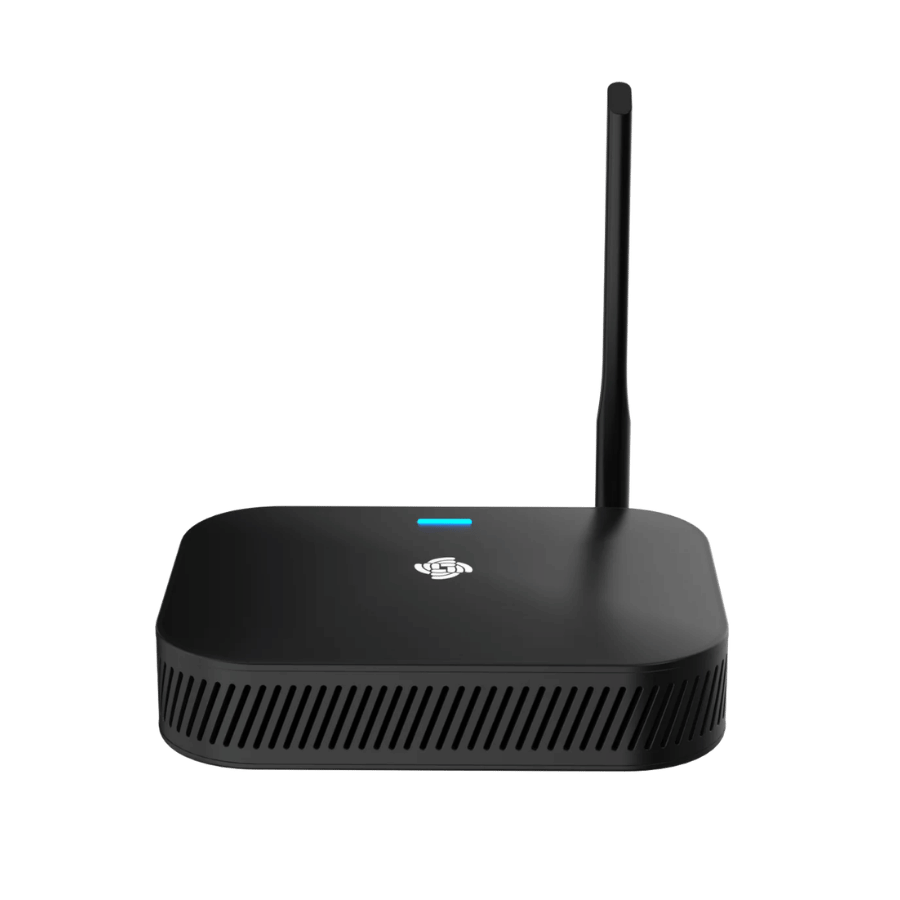
On site, setup is meant to be boring in a good way: stick sensors on doors, plug in the hub (and Ethernet if you are using it), assign rooms in the dashboard. The hub handles connectivity from there.
What This Means for Your Trip
LTE works where you have cell service. StayPut uses worldwide LTE in areas with cellular coverage, similar to how a phone would get data. If you are heading somewhere with weak signal, plan gateway placement accordingly and test before curfew.
Conference hotels, schools, and some properties offer reliable wired internet in the room or at a desk. If you know the destination has good hardlined internet, Ethernet is a great first choice. LTE is still there as backup.
Gateway offline alerts are on by default. StayPut sends connectivity alerts out of the box. If your hub goes offline, the right people get notified so you can fix it before curfew, not discover the problem after a door event never arrived. You can adjust notification preferences in your account, but we turned this on by default because a disconnected hub is the kind of thing you want to know about immediately.
When a door opens after curfew, StayPut notifies chaperones via push, email, and SMS based on your preferences. Whether the hub reached us over Ethernet or LTE, your phones still do their job.
When Wi-Fi Still Matters (And When It Does Not)
You will still use Wi-Fi for normal trip life: student phones, your laptop, streaming a movie in the lobby. StayPut does not replace that.
What we are saying is simpler: your door monitoring should not depend on hotel guest Wi-Fi.
Chaperones set up trips from the web dashboard before travel (rooms, students, curfews, invites). That runs on your internet at school or home. At the hotel, the hardware path is sensor → hub → Ethernet or LTE → StayPut. The hotel’s guest Wi-Fi network is not in that chain.
Chaperone phones use their own cellular or Wi-Fi for push and SMS alerts. That is separate from how the gateway talks to StayPut.
Practical Tips for Trip Day
- Plug in the gateway where it has power and a reasonable cell signal, even if you plan to use Ethernet.
- Use Ethernet when you have a trusted wired connection at the property. The hub will prefer it and fall back to LTE if needed.
- Check gateway status in the dashboard after install and again before curfew. If something goes wrong, gateway offline alerts should reach you automatically.
- Bring your sensors and adhesive strips like any other trip equipment. Hotel guest Wi-Fi troubleshooting is one thing you can leave off the list.
See How It Works for the full setup flow, or the docs on setting up the gateway.
The Short Version
Hotel guest Wi-Fi is unpredictable. Overnight monitoring cannot be.
StayPut’s gateway uses LTE by default, supports Ethernet when you have good wired internet, and fails over automatically between them. Gateway offline alerts are enabled by default, so you know if the hub drops before curfew does. You handle the students. We watch the doors.
Want to see the hardware?
- Products for the gateway and door sensors
- Pricing for trip hardware options
- Contact us if you have questions about coverage at a specific property
StayPut assists monitoring and notification during curfew. It does not replace adult supervision, chaperone judgment, or your organization’s policies. Gateway LTE requires cellular service in your usage area when Ethernet is unavailable.